MockupScreens News and Releases

MockupScreens Product Blog

Search-Replace Feature and Faster Performance: MockupScreens 4.81

February 19th, 2014

Sometimes you want to rename something on your mockups, and that small change needs to be propagated to dozens of other screens.

With MockupScreens 4.81 you can Search / Replace any text on all screens at once:

  • You can search widgets or comments (or both)
  • Screens are automatically filtered and the phrase is highlighted
  • When you are sure, click “Replace All” button

You can download MockupScreens 4.81 from the main website.

(Complete list of improvements and fixes is below.)


New in MockupScreens 4.81:

  • Search/Replace in both widgets and comments.

Improvements:

  • Much better performance when typing text in complex screens.
  • Moderately better performance when selecting widgets on complex screens.
  • Registered users can change license key from new “Renew license” window, instead of going to “Buy the full version” window which was confusing.
  • New images are inserted with their original size and aspect ratio.
  • Images have new option “Restore original size” on “Geometry” panel.
  • When adding a new widget, mouse pointer positions at the widget’s right-bottom corner, which is much more practical for resizing etc.

Fixes:

  • Background color for dialogs no longer incorrectly gets into the corners.
  • Occasionally dropdowns (e.g. skin chooser) stopped working temporarily.
  • On Mac, “Show tips” popup was not displayed when launching.
  • Captionless Dialogs had fain “ghost” lines in BW and MSIE skins
New Dialog Widget: MockupScreens 4.80

January 28th, 2014

Many MockupScreens users have requested a Dialog as a separate widget.

And here it is:

What is of great importance for MockupScreens team, we have migrated to much newer versions of Python and wxPython. Now only several (although far from trivial to solve) prerequisites are left to finally begin work on MockupScreens version 5!

You can download MockupScreens 4.80 from the main website. Existing users are eligible for free upgrade within 12 months of original purchase, just use your existing license key.

Below is the complete list of what’s included in MockupScreens 4.80. Enjoy!

- Igor


New:

  • Dialog - new widget, in all skins.

Improvements:

  • Window background color can be changed in Mac OSX skin.
  • Window background color can be changed in Safari skin.
  • Custom colors persist between sessions.
  • When root group is selected, menu item Drawing/Rename group is disabled.
  • Most widgets now have 100pix default width.
  • Added splash screen on startup, which shows MockupScreens version and whether it’s registered or not.
  • Better rendering of shadows etc when canvas is zoomed-in.
  • Right-click shortcut menus were reorganized and some items renamed.
  • Right-aligned text now grows to the left, when the wrapping is off.

Fixes:

  • Pasting an image from other applications now works correctly for: jpeg, gif, bmp, png, tiff, ico.
  • Application doesn’t hang any more when user closes the Edit Group Name window.
  • User wasn’t able to select “Master Screens” node or any group under it.
  • Dropdown caption is now properly aligned in property panel.
  • User couldn’t select general (unnumbered) comment.
  • Property panel was empty if initialy loaded project has a widget group as a selection.
  • There were instances when user wasn’t able to select a Mark widget.
  • Custom background color produced visible borders for some widgets.
  • “Tip of the Day” window sometimes got behind the main window when user switched between MockupScreens and other applications.

Other:

  • Migrated to much newer versions of Python and wxPython.


Happy New Year and 2013 Highlights

January 6th, 2014

Happy holidays and all the best in 2014!

I hope 2013 was a great year for you. It surely was for MockupScreens, it got improved quite a bit. Below are the highlights, followed by the complete list of 76 (!) improvements and 65 bug fixes added during 2013:


Most frequently requested features added in 2013

  • Master screens: Propagate your changes to many screens at once
  • Export to MS Word: export your mockups to a Word document, and then continue developing your document further.
  • Proper web skins: plain “corporate” skin, a more colorful yet business looking skin, and more informal skin.
  • MockupScreens Portable: no installation required
  • Windows 8 skin
  • Printing in landscape orientation: print your mockups as “big and clear” as they can be, for example for your management board
  • Better quality images in exports and printing: much cleaner images than before
  • Calendar (date-picker) widget
  • Link widget: add basic interactivity to your mockups in less clicks and more intuitively than before

Detailed list of other improvements in 2013

  • Multiple selected widgets now can be resized at the same time.
  • Form maximum size increased from 1600*1600px to 7680*4320px
  • Font properties now can be set for compound widgets.
  • Thumbnails rendering is now much faster when quickly changing skins.
  • Comments now can be deleted via the comment “bubble” contextual menu.
  • An image widget will be created when copying and pasting an image file or image data into a form.
  • Windows installer supports per-user and site-wide installs.
  • Installer improvements for users without administrator rights under windows.
  • Installing to Program Files now works correctly on all machines, it’s also the default (on Windows).
  • Improved the scaling of images when exporting to PDF. Exported images uses now 96DPI resolution.
  • Added a “Fix to Text” contextual option for widgets.
  • Improved and simplified “Change Multiple Widgets” dialog.
  • Changed the font size of comments in exported documents from 14px to 11px.
  • Improved the naming of elements in the change multiple widgets dialog.
  • New groups are automatically selected and scrolled to in screen trees.
  • The font toolbar and the change multiple widget dialog now modify the sizes of both fonts in multiwidgets
  • Default value of compound widget label is “Label” instead of “Text”.
  • Change multiple widgets dialog now uses the same font size control as the toolbar.
  • Image widget property editor layout updated.
  • Loading an incompatible version project now shows a dialog asking to upgrade to a newer version.
  • Custom colors in all color selectors are remembered for the current session.
  • Windows installer and uninstaller checks if a MockupScreens process is running in order to avoid corrupted installs.
  • All master form attributes get copied when you apply or create a screen from master.
  • If a master form changes, changes propagate to the dependent screens.
  • If you make changes to a form on a dependent screen, these changes persist (ie. they don’t get overridden when master form changes propagate).
  • Screens tree new items are now placed regarding the current selection.
  • When adding a new screen or master screen, the relevant screen tree control scrolls to it.
  • Scrolling is now possible while reordering items in the screens tree. In windows the panel will scroll if you drag an item near the top or the bottom. In MacOS you can use the mouse/trackpad scroll function while dragging the item.
  • If “Show Marks” editor option is disabled, and an user tries to ad a mark, a warning dialog is shown.
  • The about dialog shows the registration status, and the registration dialog confirms registration when a valid serial is entered.
  • Improved the layout of the master screens screens tree contextual menu.
  • A master screen now can be selected with a double click in the master screen selection dialog.
  • When adding a new item into a group, the group is now expanded.
  • The state (expanded/collapsed) of the screens trees groups is now stored in the project files.
  • Renamed View->Display Comments menu item to View->Toggle Comments
  • System information is written to a separate file so it wouldn’t get overwritten by the rotating log file handler.
  • All skins use now black as default widget text color.
  • When printing, images are now horizontally centered.
  • Font size now can be entered manually. The control now uses a more standard list of predefined font size.
  • Undo manager now tracks skin changes.
  • Simplified scenario export dialog.
  • Renamed “Jump to Screen” to “Link” in widget properties.
  • Improved slideshow toolbar layout.
  • The 30-day trial period is now restarted each time a newer version is installed.
  • When overwriting a file during PDF or RTF export, user is asked for confirmation.
  • Several screens trees usability improvements. Added a “New Master” button.
  • Increased the height of widgets’ multiline properties inputs.
  • Moved the import and export menu items to the file menu).
  • Added “Select All” option to the context menu and the edit menu.
  • When exporting to PDF or RTF, a sensible output filename is suggested based on what is being exported (project, scenario or screen).
  • Added node tooltips to the screen tree saying which master screen is applied.
  • Some Minor Print/Export dialog improvements.
  • Screens trees reordering visual improvements.
  • Pasted screens naming improvements in order to avoid duplicate names.
  • Improved undo functionality for widgets font size changes.
  • The last used custom image folder is stored during a program run. If such a folder is not stored, double-clicking the image opens the gallery; otherwise it opens the custom image folder.
  • Images are now shown in screens thumbnails.
  • Compound widgets now can be resized vertically.
  • Comments are not copied when copying and pasting a screen.
  • Improved dynamic canvas resizing. Canvas size is not reduced while the mouse is being dragged, better usability during widget manipulation in those cases.
  • The label part of compound widgets and the field part of Label.Field now can be aligned vertically.
  • For screens, the Paste operation does not keep the original comments. Added a Paste With Comments contextual menu item with keyboard shortcut Control + Shift + V to keep these.
  • Added scrollbar options for Label.List widget.
  • Better compound widgets advanced properties panel layout.
  • Improved the usability of widget’s resize handles.
  • Lot’s of minor usability improvements.
  • New themes selection dropdown
  • Feedback forms can be accessed from inside the app (Help -> Give Feedback).
  • Improved screen canvas resizing.
  • Improved file save reliability for network and removable drives.
  • In MacOS now Arial is used as default font in order to avoid geometry issues when switching skins.
  • Improved screens tree reordering.
  • Improved screens tree thumbnails rendering speed.
  • Background color now is applied in Safari forms.
  • Added an “Unregistered Version” clickable yellow line on top of canvas.
  • Feedback forms will be shown on app runs from time to time.


Bugs fixed in 2013

  • Thumbnails weren’t refreshed after applying or unlinking master screens.
  • Thumbnails weren’t refreshed after setting the Form background color until some user action.
  • The background color property editor value gets updated when a master screen is applied or unlinked.
  • The suggested title and file name is not longer cropper when exporting a project with dots in it’s name.
  • Under some specific circumstances, the selection operation didn’t worked properly after an undo operation.
  • Word wrap was incorrectly wrapping punctuation characters
  • Label.Dropdown appearance was broken when using an empty value for the dropdown.
  • Multiwidgets appearance was broken when using an empty caption.
  • Applying a master screen is now correctly undo-ed.
  • Thumbnails of affected regular screens are properly refreshed when a master screen is deleted.
  • Fixed how the line envelope is calculated. The perpendicular vector was incorrectly calculated, which caused selection issues in certain situations.
  • The dialog asking to show marks if these are disabled and the user tries to add one, is now shown just one time for each mark.
  • Now it’s not possible to select a widget by clicking on the comment position when show comments option is disabled.
  • Master groups are no longer added to the main screens tree when imported a project.
  • Unicode and special characters are better handled in exported documents.
  • Toolbar font options are now disabled for widgets which does not support them.
  • Font selector “Default” item now works as expected.
  • Fixed some issues with very large font sizes.
  • The application could crash when printing if the spooler service was not started.
  • Undoing a new screen operation now does keep showing that screens if there aren’t other screens in the project.
  • The fit to text button in the geometry properties tab is only enabled if the selected widget uses text.
  • A widget’s position sometimes changed during a resize operation.
  • Rounded corners where not drawn properly in forms.
  • Windows 7 Skin now uses an Internet Explorer 8 web toolbar.
  • In some rare circumstances images were not shown in the print preview.
  • Text widget’s size can now be reduced by direct manipulation beyond the automatic best size if word wrapping is enabled.
  • Properties panel select all shortcut didn’t selected it’s text.
  • On MacOS prevented the top windows from being raised over already open modal dialogs on application reopen.
  • Under some rare circumstances, Mark panel is displayed though Mark widget is no longer selected.
  • Comments marks where shown in in snapshots when the related option was toggled off.
  • The undo button become active after loading a project.
  • Comments were displayed in HTML/Print/PDF/RTF exported file though “Don’t Print Comments” option was selected for these formats.
  • Scenario export didn’t asked for overwrite confirmation.
  • Under some rare circumstances, the application crashed on exit.
  • The application crashed on start up if Tahoma font was not installed in the system.
  • Mac dmg now displays correct version.
  • Now derived screens form dimensions are not overridden by the master ones in the exported documents.
  • Widget groups from master screens now can’t be moved.
  • Windows uninstaller now deletes shortcuts properly.
  • Resize and align tools ignore selected widgets from master screens.
  • Fixed several minor undo feature issues.
  • The cut, copy and paste operations in the main menu take into account the master screens control, and so the keyboard shortcuts there work correctly.
  • Fixed pasting to a screen tree with no screen selected.
  • In screens tree groups are no longer allowed to be dragged inside themselves or their descendant groups.
  • Updated send feedback url.
  • Fixed and improved color selectors.
  • Fixed scrollbar buttons and tab transparency issues in MacOS and Safari skins.
  • Screen scrollbars where not drawn properly when changing from a screen that needs scrollbars for the canvas to a one that doesn’t.
  • Fixes some issues under heavy usage.
  • Fixed several miscellaneous aesthetic widgets issues in various skins.
  • Improved internal process communication, fixing some issues under heavy usage and making the app slightly faster.
  • The layout of compound widgets could be broken when changing the font size.
  • Fixed compound widgets fit-to-text behavior.
  • The canvas didn’t scroll when while moving a widget with the keyboard..
  • Comments of widgets in a group are correctly handled in screen snapshots and document exports.
  • The MacOS installer background image was not properly shown in MacOS 10.9.
  • In MacOS, the windows 8 tab borders were not properly drawn.
  • In the widgets’ caption input, the alternate name field now initially sets it’s cursor to the end. This fixes an issue with the tab key not working as expected in MacOS.
  • The last main toolbar font size selection propagated to the next selected widget.
  • Pasted widgets now use the grid size as the offset unit, this helps to keep relative positions of a pasted group of widgets intact when moving them, while snap to grid is enabled.
  • Pasting a standard screen or group into master screens didn’t work.
  • Under some circumstances, the last screens tree thumbnail was not shown entirely .
  • When copying a screen derived from a master, the master’s widgets were always placed over the standard screen ones.
  • The contextual menu key is now properly handled in screen trees.
  • Fixed “scroll to” behavior of pasted screens. The screen tree would sometimes jump to top after pasting.
  • Fixed pasting groups of screens. The screen names were not altered, and pasting a group when a master screen was selected didn’t work.
  • Zillion minor stability and performance improvements.

MockupScreens 4.75: Calendar (Date-Picker)

December 18th, 2013

Many users have requested Calendar (Date-picker) widget, so here it is! You can download MockupScreens 4.75 from the main website. Complete list of improvements is below.

Note that localization for non-English languages is coming soon.

Here is the complete list of improvements for 4.75:

New:

  • Calendar widget.

Improvements

  • Compound widgets now can be resized vertically.
  • Comments are not copied when copying and pasting a screen.
  • Improved dynamic canvas resizing. Canvas size is not reduced while the mouse is being dragged, better usability during widget manipulation in those cases.
  • The label part of compound widgets and the field part of Label.Field now can be aligned vertically.
  • For screens, the Paste operation does not keep the original comments. Added a Paste With Comments contextual menu item with keyboard shortcut Control + Shift + V to keep these.
  • Added scrollbar options for Label.List widget.
  • Better compound widgets advanced properties panel layout.

Fixes

  • The layout of compound widgets could be broken when changing the font size.
  • Fixed compound widgets fit-to-text behavior.
  • The canvas didn’t scroll when while moving a widget with the keyboard..
  • Comments of widgets in a group are correctly handled in screen snapshots and document exports.
  • The MacOS installer background image was not properly shown in MacOS 10.9.
  • In MacOS, the windows 8 tab borders were not properly drawn.
  • In the widgets’ caption input, the alternate name field now initially sets it’s cursor to the end. This fixes an issue with the tab key not working as expected in MacOS.
  • The last main toolbar font size selection propagated to the next selected widget.
  • Pasted widgets now use the grid size as the offset unit, this helps to keep relative positions of a pasted group of widgets intact when moving them, while snap to grid is enabled.
  • Pasting a standard screen or group into master screens didn’t work.
  • Under some circumstances, the last screens tree thumbnail was not shown entirely .
  • When copying a screen derived from a master, the master’s widgets were always placed over the standard screen ones.
  • The contextual menu key is now properly handled in screen trees.
  • Fixed “scroll to” behavior of pasted screens. The screen tree would sometimes jump to top after pasting.
  • Fixed pasting groups of screens. The screen names were not altered, and pasting a group when a master screen was selected didn’t work.

MockupScreens 4.74: Link Widget Added

November 19th, 2013

MockupScreens 4.74 is live and you can download it on the main website.

Beside the usual batch of fixes/improvements it brings the Link widget. That’s at least several clicks less than before - per link - when mocking the screens of common today applications.

New:

  • Link widget

Improvements:

  • Changed the font size of comments in exported documents from 14px to 11px.
  • Renamed the Edit->Toggle Comment Visibility menu item to Edit->Toggle Comments
  • Improved the naming of elements in the change multiple widgets dialog.
  • New groups are automatically selected and scrolled to in screen trees.
  • The font toolbar and the change multiple widget dialog now modify the sizes of both fonts in multiwidgets
  • Default value of compound widget label is “Label” instead of “Text”.

Fixes:

  • Thumbnails weren’t refreshed after applying or unlinking master screens.
  • Thumbnails weren’t refreshed after setting the Form background color until some user action.
  • The background color property editor value gets updated when a master screen is applied or unlinked.
  • The suggested title and file name is not longer cropper when exporting a project with dots in it’s name.
  • Under some specific circumstances, the selection operation didn’t worked properly after an undo operation.
  • Word wrap was incorrectly wrapping punctuation characters
  • Label.Dropdown appearance was broken when using an empty value for the dropdown.
  • Multiwidgets appearance was broken when using an empty caption.
  • Applying a master screen is now correctly undo-ed.
  • Thumbnails of affected regular screens are properly refreshed when a master screen is deleted.
  • Fixed how the line envelope is calculated. The perpendicular vector was incorrectly calculated, which caused selection issues in certain situations.

Win8 Skin and Many Small Improvements

October 29th, 2013

MockupScreens 4.73 is available from the main website.

The main addition is new Windows 8 skin. And there is myriad of small improvements - the full list is below.

Enjoy!

Complete list of changes included in 4.73 follows.

New:

  • Windows 8 skin.

Improvements:

  • Change multiple widgets dialog now uses the same font size control as the toolbar.
  • Form maximum size increased from 1600*1600px to 7680*4320px
  • Image widget property editor layout updated.
  • Loading an incompatible version project now shows a dialog asking to upgrade to a newer version.
  • Font properties now can be set for compound widgets.
  • Custom colors in all color selectors are remembered for the current session.
  • Windows installer and uninstaller checks if a MockupScreens process is running in order to avoid corrupted installs.
  • Better attribute value management for masters Forms:
    - All master form attributes get copied when you apply or create a screen from master.
    - If a master form changes, changes propagate to the dependent screens.
    - If you make changes to a form on a dependent screen, these changes persist (ie. they don’t get overridden when master form changes propagate).
  • Screens tree new items are now placed regarding the current selection.
  • When adding a new screen or master screen, the relevant screen tree control scrolls to it.
  • Scrolling is now possible while reordering items in the screens tree. In windows the panel will scroll if you drag an item near the top or the bottom. In MacOS you can use the mouse/trackpad scroll function while dragging the item.
  • If “Show Marks” editor option is disabled, and an user tries to ad a mark, a warning dialog is shown.
  • The about dialog shows the registration status, and the registration dialog confirms registration when a valid serial is entered.
  • Improved the layout of the master screens screens tree contextual menu.
  • Multiple selected widgets now can be resized at the same time.
  • A master screen now can be selected with a double click in the master screen selection dialog.
  • Thumbnails rendering is now much faster when quickly changing skins.
  • When adding a new item into a group, the group is now expanded.
  • The state (expanded/collapsed) of the screens trees groups is now stored in the project files.
  • Renamed View->Display Comments menu item to View->Toggle Comment Visibility
  • System information is written to a separate file so it wouldn’t get overwritten by the rotating log file handler.

Fixes:

  • The dialog asking to show marks if these are disabled and the user tries to add one, is now shown just one time for each mark.
  • Now it’s not possible to select a widget by clicking on the comment position when show comments option is disabled.
  • Master groups are no longer added to the main screens tree when imported a project.
  • Unicode and special characters are better handled in exported documents.
  • Toolbar font options are now disabled for widgets which does not support them.
  • Font selector “Default” item now works as expected.
  • Fixed some issues with very large font sizes.
  • The application could crash when printing if the spooler service was not started.
  • Undoing a new screen operation now does keep showing that screens if there aren’t other screens in the project.
  • The fit to text button in the geometry properties tab is only enabled if the selected widget uses text.
  • A widget’s position sometimes changed during a resize operation.

MockupScreens 10th Anniversary Discount - All Licenses 50% Off

October 3rd, 2013

In 2003, I started MockupScreens as a simple tool for myself and a small community of analysts. It took another two years making it good enough to show outside my circle of buddies and coworkers.

It grew ever since, striving to help its users. Just to mention the most recent improvements: export to Word and master screens.

And the result after 10 years? MockupScreens is now being actively used by thousands of people all over the world.

Thank you all!

To mark the occasion, all licenses will be 50% off this Thursday and Friday, (Oct 3-4) at www.MockupScreens.com.

Spread the word.

MockupScreens Portable: No Installation Required!

September 12th, 2013

In corporate environments, installing a software product on one’s computer can pose a non-trivial problem.

As from today, you can use MockupScreens Portable just for such situations. No installation is required: just extract the zip file and run the executable directly!

You can use your existing license to unlock the MockupScreens Portable. Note that it’s for Windows only.

You can download the MockupScreens Portable from the main website.

Enjoy!
Igor

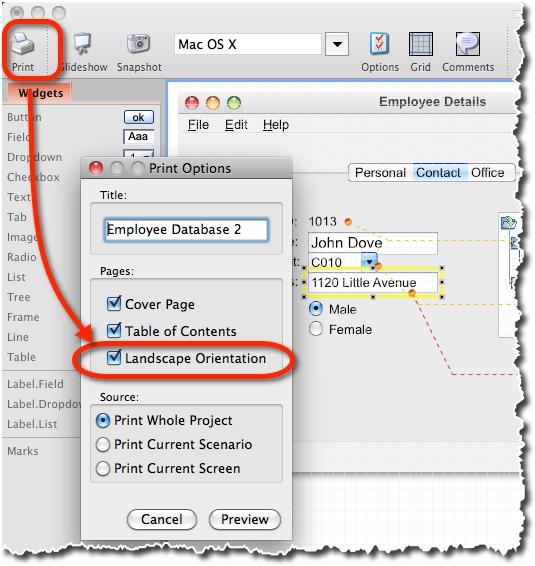
MockupScreens 4.71 - Printing to Landscape AND Clear Images

July 13th, 2013

Sometimes you have to send the hardcopy of your mockups to your project’s management board. Or you simply need to discuss the screens using the old fashioned printouts.

In those situations it’s important for your mockups to be as “big and clear” as they can be. Which usually means printing them in landscape orientation, to get the needed space for your GUI to present itself in the best light possible.

MockupScreens 4.71 brings two things to help you with that: 1) printing to landscape directly and 2) much cleaner images than before.

You can download MockupScreens 4.71 right away from the main web site!

PS. Scroll down below the screenshot to check the complete list of improvements and fixes…

Print to landscape

###

New:

  • Printing in landscape orientation.
  • Better quality images in exports/printing

Improvements:

  • All skins use now black as default widget text color.
  • When printing, images are now horizontally centered.
  • Font size now can be entered manually. The control now uses a more standard list of predefined font size.
  • Comments now can be deleted via the comment “bubble” contextual menu.
  • Undo manager now tracks skin changes.
  • Simplified scenario export dialog.
  • Renamed “Jump to Screen” to “Link” in widget properties.
  • Improved slideshow toolbar layout.
  • The 30-day trial period is now restarted each time a newer version is installed.

Fixes:

  • Rounded corners where not drawn properly in forms.
  • Windows 7 Skin now uses an Internet Explorer 8 web toolbar.
  • In some rare circumstances images were not shown in the print preview.
  • Text widget’s size can now be reduced by direct manipulation beyond the automatic best size if word wrapping is enabled.
  • Properties panel select all shortcut didn’t selected it’s text.
  • On MacOS prevented the top windows from being raised over already open modal dialogs on application reopen.
  • Under some rare circumstances, Mark panel is displayed though Mark widget is no longer selected.
  • Comments marks where shown in in snapshots when the related option was toggled off.
  • The undo button become active after loading a project.
  • Comments were displayed in HTML/Print/PDF/RTF exported file though “Don’t Print Comments” option was selected for these formats.
  • Scenario export didn’t asked for overwrite confirmation.
  • Under some rare circumstances, the application crashed on exit.
  • The application crashed on start up if Tahoma font was not installed in the system.
  • Mac dmg now displays correct version.
  • Other minor fixes.

Today and Tomorrow on MacZOT: MockupScreens 70% Off

June 10th, 2013

Thanks to MacZOT, today and tomorrow you can get MockupScreens at $29.95!

If you are a Mac user and do want the 70% discount, go to MacZOT’s daily deal page.