| |
Sketch Screens in Minutes |

Use Screen Prototypes For Clear Software Requirements - in 5 Easy Steps
by Igor Ješe, April 2006
Note from the author: Screenshots are a bit out-of-date but they still serve the main purpose, which is to visualize the ideas from the article. If you want to see current screenshots and capabilities of MockupScreens check it's Homepage or Screenshots page.
I'm in software development for 15 years and I can tell you one thing for sure: misunderstandings are costly in software development. If you are not careful, you could find yourself aiming at the moving target or even end up building the application nobody needs or wants. I'll show you how to properly apply screen prototypes and avoid this trap, while having fun in the process.
There are many tools commonly used for software prototypes and GUI prototyping. Over time I have used most of them and what I have found is that they all lack in two things: speed and ease of use of paper sketches (which you can't maintain, so they are not really a solution either). Now with Mockup Screens I'm satisfied with both, and I can focus on the real problem: to quickly engineer clear requirements for a software application.
Note that Mockup Screens is very capable of solving whole category of tasks quickly and efficiently. You can use it (and many do) quite differently than I'll explain here, just experiment with screen prototypes and find what works for you.
Think what the users want from your application. Choose and create scenarios that people will use most often. Don't aim for perfection, right now prototypes are more important things to do. Try to work together with your customer. If this works out fine, continue teamed up this way: it's very effective. More probable though, you'll have difficulties so don't push further - involve the customer where it counts the most, with screen prototypes you'll propose later.
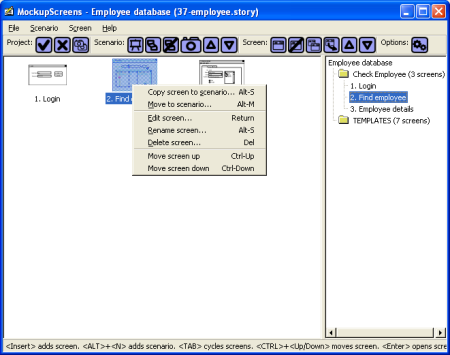
Decide which is the most important scenario and sketch screens for it. Imagine these are paper sketches and focus on speed, not on design or perfection. Populate screens with data that will provoke reaction. Remember what Wikipedia says on software prototyping: "[Prototyping] is not a tool to prove that we are right. It is a tool to show us where we are wrong."
Repeat this for the next most important scenario and the next one. Copy screens from existing templates or finished scenarios wherever you can. Choose two or three scenarios you want to discuss with the customer. Don't decide on too many or you'll get poor feedback.
Before the workshop, skim through scenarios yourself, they are your prototype. Put marks and comments where you have questions or want to emphasize something. If you want to make changes interactively and experiment together with the customer, present the prototypes with the “slideshow” option on your notebook (just remember to save the file under different name first). Otherwise just export scenarios and discuss them in your web browser or over a printed hard-copy.
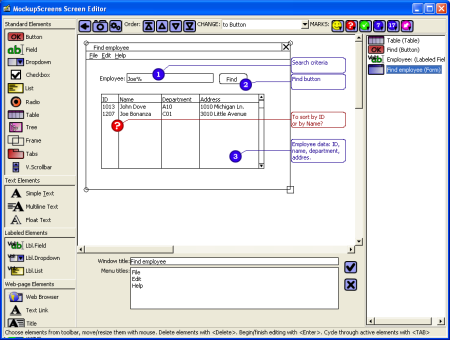
Of course, the same process applies to web pages and web application prototypes. Liberate use of predefined dummy pictures really speeds things up here.
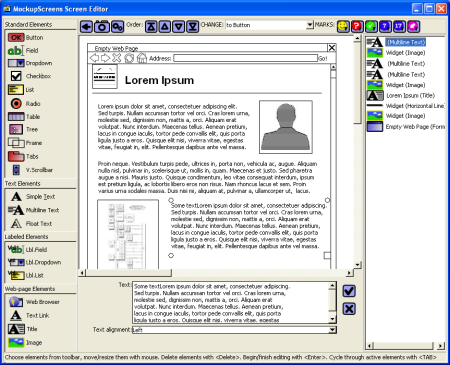
On the workshop with customer, present your ideas for each screen: what particular elements mean and why they are there, what happens when user clicks a button, etc. Determine for each piece of data where does it come from. For example if the table has a “Date” column, which date is it: the creation date, date of the last update or something entirely different. These are real software requirements, nail them. Pay special attention to data which has to be calculated or comes from other systems.
Be prepared to listen, and get the customer do the talking. Your goal is to get feedback, just moderate a bit to stay on the topic and always get back to screen prototypes.
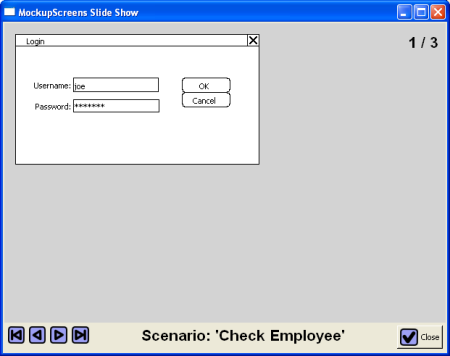
When you get the feedback, improve your screen prototypes and requirements accordingly, and always send them to customer for confirmation. If you got through to the customer, her mind could still be processing those screen prototypes and could come up with quite a few surprises.
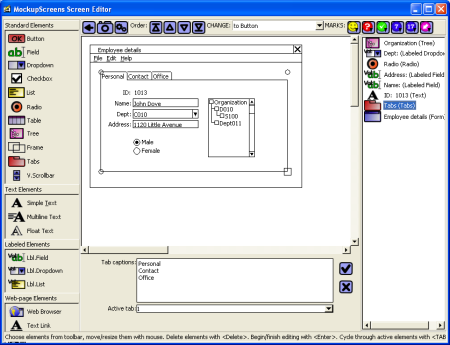
When a scenario is finished, invest five more minutes and "empty your head", go through screen prototypes and document screens one by one. Focus on getting everything on paper as it comes to mind. Don't analyze or structure anything, let the associations flow and take quick notes. Then apply some minimal structure, but don't do anything that doesn't improve the information. In this two-stage manner, you will be able to do this extremely fast. One particular way is to export the scenario, print it (web page will open automatically) and write notes on the paper copy. Then copy screens to Microsoft Word and structure these notes while typing.
When you are finished, you will have a large part of both software requirements and user interface specifications. For smaller applications that might even be all you'll ever need.
This article doesn't cover everything about GUI prototyping, and I had to avoid many important aspects of software requirements discipline. But it is effective and you'll find this particular approach very rewarding: I surely enjoy my work better this way.
In short, experiment, find what works for you and have fun!
With MockupScreens you can create five screens in ten minutes, you don't need any programming knowledge or prior training. Pick the license that describes your needs and start creating screen sketches!
|
|
All prices are in US dollars!
Read more about Mockup Screens...
Read what MockupScreens users say:
"Instant productivity! It is so easy that I can prototype realtime in a meeting." - Laura Arlov, author of "GUI Design for Dummies"
"I wanted to take a moment and write you this note for the excellent contribution you have made via this tool." - Adnan Fida, Sr. Technical Team Leader, Point2 Technologies
"Your product provides the perfect tool for getting the idea across without giving the impression that the project is already done!" - Brenner Klenzman, President, WilloWare Inc.
"MockupScreens helped me do a better job at helping my customer understand what they're going to get." - Sean Winstead, Director, Surehand Inc.
"MockupScreens allows our programmers to turn my ideas into project code quickly." - J.D.Young, President, Digital Retail Solutions
"I have been looking for something like this for a long time!" - Eileen S. Haag, e-Learning Applications Group Manager
| Copyright © 2004-2007, Igor Ješe | |